


Leistungen
Alles, was du brauchst
Statastic Basketball
BASIC
FREE
-
Record in-game statistics
-
Full box score (your team)
-
Team statistics: event comparisons
-
Team management
-
League management
-
Recording automations
Statastic Basketball
PRO
€3,99 monthly
€29,99 yearly 50 % OFF
Includes every feature from BASIC and...
-
Full box score (opponent team)
-
+/- ranking for line-ups
-
Team statistics: score trend & shooting %
-
Player statistics
-
Live-ticker
-
Seasonal statistics
-
Share your data
-
Shooting sector analysis
-
Court position tracking
*prices may differ depending on region


How to share my game statistics?
How to use heatmaps to see where game actions occured?
How do I create season statistics for my team?

IS IT POSSIBLE TO CREATE A BACKUP FOR MY RECORDED GAMES?
#backup #share #multiuser
Yes, it is!
Select the settings icon on the bottom left
Choose "Manage your backups"
Create your backup by clicking on "create backup"
When finished you get the info at the bottom of your screen

HOW DO I SEND DEBUG INFO TO THE DEVELOPER TEAM?
#help #from_developer
Go to the main screen and click on the settings icon on the bottom left
Scroll to the very end and select "send debug info to developer"
Choose your e-mail client
Send us your debug info
FAQ
Q: What do I need to know when updating to the new app version?
#newversion
A: With the update to our brand-new version, all your games will be carried over automatically. Depending on how many games you’ve already recorded, the data sync may take a little while. Please don’t close the app while the synchronization is still in progress.
Q: How do I create a game and start recording?
#newversion #creategame
A: Click the + Button (denoted with "New game") at the bottom of the start screen and follow the instructions on the screen.
Watch our video tutorial for a step-by-step guide.
Q: How do I create season statistics?
#season #statistics
A: Click "Season" at the bottom right, then "New season" at the bottom and follow the instruction on the screen.
Watch our video tutorial for a step-by-step guide.

Leistungsname
Dies ist ein Textabschnitt. Klicke auf „Text bearbeiten” oder doppelklicke auf das Textfeld, um den Inhalt deinen Bedürfnissen anzupassen. Füge relevante Infos für deine Besucher hinzu.
Leistungsname
Dies ist ein Textabschnitt. Klicke auf „Text bearbeiten” oder doppelklicke auf das Textfeld, um den Inhalt deinen Bedürfnissen anzupassen. Füge relevante Infos für deine Besucher hinzu.


Leistungsname
Dies ist ein Textabschnitt. Klicke auf „Text bearbeiten” oder doppelklicke auf das Textfeld, um den Inhalt deinen Bedürfnissen anzupassen. Füge relevante Infos für deine Besucher hinzu.
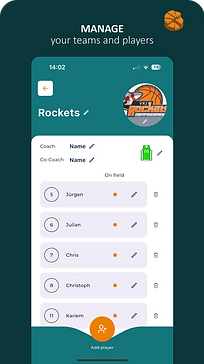
Manage Teams, Season and Leagues

Track your game action

Mark positions of your game actions

Live ticker

Box score

Team & individual statistics

plus/minus for players and player combinations
share results
Season stats
Recording assistants
Backup your data
Recording screen
Easily record stats in real time with intuitive input. Manage game time, track substitutions, and jump directly to live analytics – all from one screen.
Main screen
The starting point of the app gives you a clear overview of all games. Filter by team, league, or season, start new recordings, and access game settings. From here, you can also navigate directly to your team, league, and season pages.
Create game screen
Create a new game in just a few steps. Decide whether to link it to a league, choose between regular or 3x3 mode, and define if the game should be included in your season statistics.


Main screen
The starting point of the app gives you a clear overview of all games. Filter by team, league, or season, start new recordings, and access game settings. From here, you can also navigate directly to your team, league, and season pages.

Teams, leagues & seaons
Create a new game in just a few steps. Decide whether to link it to a league, choose between regular or 3x3 mode, and define if the game should be included in your season statistics.


Main screen
The starting point of the app gives you a clear overview of all games. Filter by team, league, or season, start new recordings, and access game settings. From here, you can also navigate directly to your team, league, and season pages.
Main screen
The starting point of the app gives you a clear overview of all games. Filter by team, league, or season, start new recordings, and access game settings. From here, you can also navigate directly to your team, league, and season pages.
Main screen
The starting point of the app gives you a clear overview of all games. Filter by team, league, or season, start new recordings, and access game settings. From here, you can also navigate directly to your team, league, and season pages.


Main screen
The starting point of the app gives you a clear overview of all games. Filter by team, league, or season, start new recordings, and access game settings. From here, you can also navigate directly to your team, league, and season pages.
Plus / Minus per line-up
A statistical breakdown showing all lineups used during the game. Quickly see which lineup was the most effective and contributed the most to your team’s performance. You can also filter by specific game segments for deeper insights.

STATISTICS IN USE
RECORDABLE ACTIONS
Points and Attemps
3 - Three pointer made
~3 - Three pointer attempt
2 - Regular field goal made
~2 - Regular field goal attempt
1 - Free throw made
~1 - Free throw attempt
Rebounds
ORB - Offensive rebound
DRB - Defensive rebound
General actions
AST - Assist
BLK - Block
STL - Steal (when a defensive player legally takes possession of the ball from an opposing player)
DDR - Double Dribbling
TRA - Traveling
Turnovers
TO - Turnover (when a player with possession of the ball loses possession as the result of a violation of an opposing player)
TFO - Turnover Forced (when a defender steals the ball or causes a bad pass, etc.)
TFU - Turnover Fundamental (carrying the ball, overstepping boundry on inbounding)
Fouls
FOL - Personal Foul committed
TEC - Techncal Foul committed
USM - Unsportsmanlike foul committed
DSQ - Foul that leads to disqualification
FLR - Foul received
Special actions
A! - Awesome (if you want highlight something noteworthy of a player)
ANALYZABLE STATISTICS
Our app generates several statistics and analyzable elements such as box score, points history, team KPIs, top scorers (based on field goals) and various heat maps.
A real-life example as shared directly from our app can be found HERE.
EFF - NBA Efficiency Rating is a composite basketball statistic that is derived from basic individual statistics: points, rebounds, assists, steals, blocks, turnovers and shot attempts. The efficiency stat, in theory, accounts for both a player's offensive contributions (points, assists) and their defensive contributions (steals, blocks), but it is generally thought that efficiency ratings favor offense-oriented players over those who specialize in defense, as defense is difficult to quantify with currently tabulated statistics.
+/- - Plus/Minus Index reflects how the team did while that player is on the court. If a player has a +5 PM, it means his team outscored the opponent by 5 points while he was on the court. If he has a -3, then the opposing team outscored his team by 3 points while he was on the court.
PIR - Performance Index Rating is a metric that attempts to give a perspective on a player’s total performance.
The metric is a simple addition and subtraction of positive and negative game factors.
TIM - Time played
PTS - Sum of Points made
3FGA - Number of Three point field goal attempts
3FGM - Number of Three point field goals made
3FG% - Percentage of Three point field goals made
2FGA - Number of Two point field goal attempts
2FGM - Number of Two point field goals made
2FG% - Percentage of Two point field goals made
FGA - Number of Field goal attempts
FGM - Number of Field goals made
FG% - Percentage of Field goals made
FTA - Number of Free throw attempts
FTM - Number of Free throws made
FT% - Percentage of Free throws made
ORB - Number of Offensive Rebounds
DRB - Number of Defensive Rebounds
TReb - Number of Total Rebounds
AST - Number of Assists
BLK - Number of Blocks
TO - Number of Turnover
STL - Number of Steals
FOL - Number of Fouls
A! - Number of Awesome game actions